RSS
https://lakespirit.love/rss.xml
Since a lot of people who I've shown my blog to have stared at this with a baffled "what's an are ess ess" intonation; I'm gonna do my best to explain the deal as simply as possible.- The RSS.xml I am hosting on my site is a collection of every post I've made for it in the last year, importantly also carrying each article's upload date
- RSS Readers are websites, apps, or even browser extensions - that routinely check every RSS file you enter into them, and say "hey, i checked all blog's published dates, and here are the latest ones"
- And lastly, check out "...and more!" for more places you can get more RSS files than just mine :3 :3
It is quite important to know about, if you're trying to familiarize yourself with this whole "blogging revival era" atmosphere.
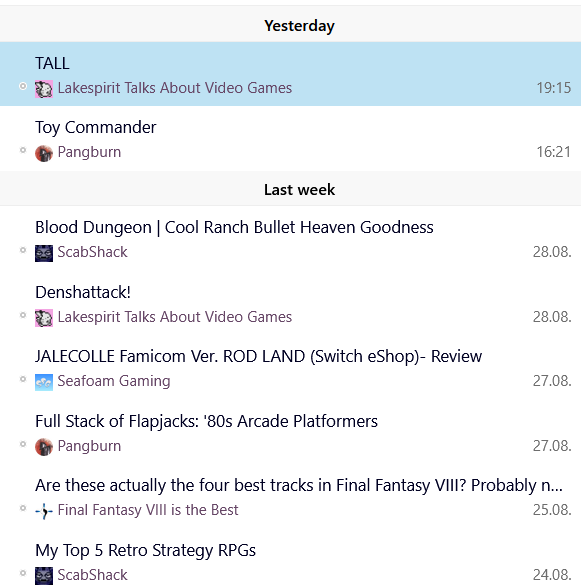
basically, after you slap a bunch of URL sources into a program, it'll generate what basically looks like twitter for cool things
Anyways: if you're purely a reader, you don't need to read anymore than this. You can use it - you're safe! BUT. If you are a blogger, reading this and thinking "this is scawwy..but I want one. How do I make one?", rest easy. Some hosters will have automatic RSS enabled, such as Hugo (so i've heard), but for us Zonelets users, we write this shit manually. Thankfully, it's basically as simple as making a .xml file in neocities itself (or if you're self-hosting, then like, notepad++), and then filling out the following layout:
<?xml version="1.0" encoding="UTF-8" ?>
<rss version="2.0">
<channel>
<title>This section is about the name and information of the blog. Put the name here</title>
<description>Fill this</description>
<link>Your website here</link>
<lastBuildDate>X MonthX, 20XX 01:00 -400</lastBuildDate>
<ttl>60</ttl><item>
<title>This is an individual article. copy and paste this block as many times as necessary. </title>
<description>Could be a description, could also just be the first few sentences</description>
<link>Article liink</link>
<pubDate>X MonthX, 20XX 01:00 -400</pubDate>
</item>
</channel>
</rss>
And then with that filled out, you slap in in an xml file, link it somewhere, and RSS users are as good to go :3
(Like many things on this site) I am blatantly stealing this structure from Faea's blog, where she goes into detail on how to implement this stuff for beginners